How Fasching Jazz Club Automated Event Publishing
How Fasching Jazz Club Automated Event Publishing and Saved Days Each Week
Fasching Jazz Club in Stockholm is a legendary venue, hosting over 300 events a year. For their marketing director, this inspiring number meant a logistical nightmare: spending one to two days every single week manually creating and publishing events across multiple platforms.
By building a simple automation in Triform, they eliminated this bottleneck, reclaimed days of valuable time, and streamlined their entire marketing workflow.
The Challenge: A 10-Day-a-Month Time Sink
Managing 300+ events a year by hand wasn’t just tedious; it was unsustainable. Each new concert required the team to manually copy and paste the same information artist, description, time, ticket link into three different platforms:
- Bandsintown
- Nortic (their ticketing platform)
This copy-paste cycle was a massive time sink and a prime source of errors.
The Results: Time Saved, Reach Improved
- Saved 1–2 Full Workdays Per Week: The marketing team reclaimed nearly 25% of their time, allowing them to focus on high-impact marketing, not data entry.
- No More Facebook Event Floods: The Google Sheet acts as a central staging area, allowing the team to publish events one by one with a single click, right when they want them to go live.
Technical Breakdown: Inside the Triform Workflow
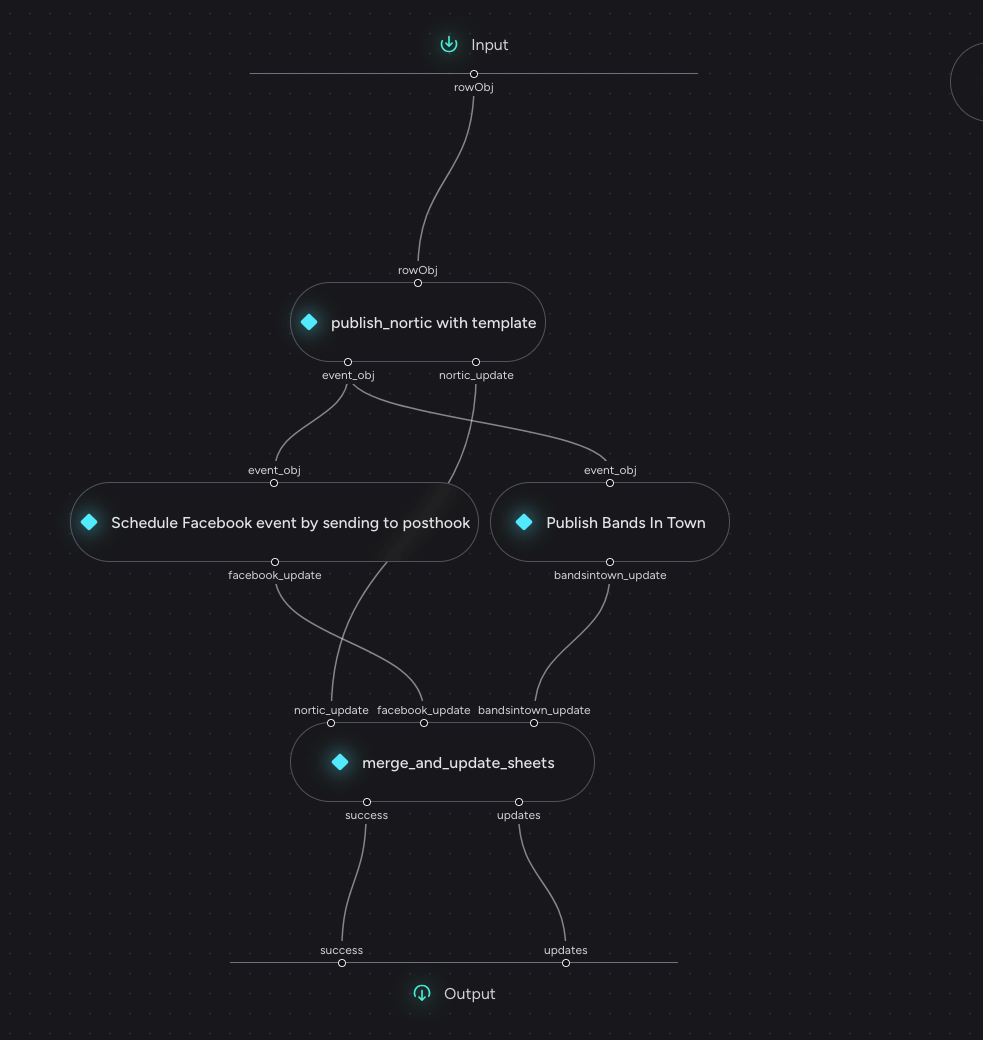
The entire automation runs visually on Triform Canvas, built around modular, no-code and low-code actions connected to each other.
1. How Fashing interacts with Triform — Google Sheets Extension
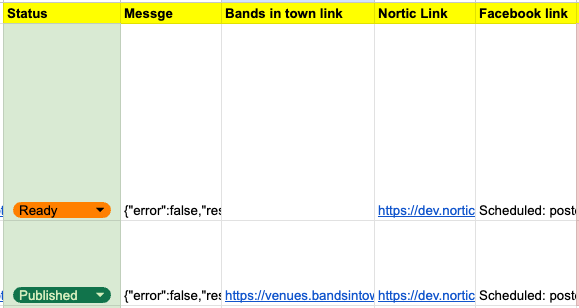
The marketing team now stages all upcoming events in a single Google Sheet (their CRM system for booking). A custom-built Google Sheets extension adds a “Publish” button in the drop-down in a meny called Triform Publisher.

When clicked, the row’s data is sent to a Triform API Endpoint, which initiates the workflow you can also change the settings with new Endpoints and URLs.
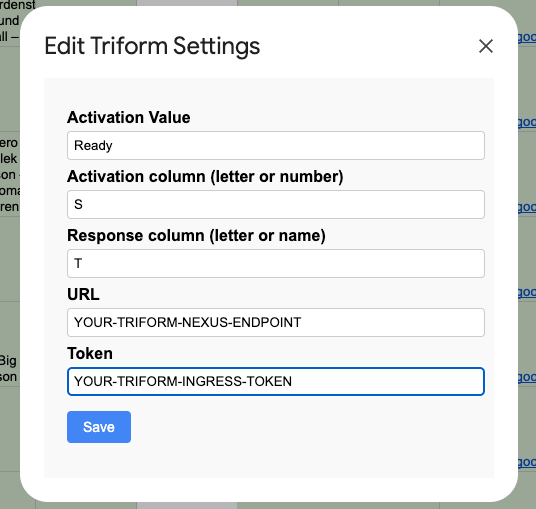
To Publish an event they in col S select the Col value as Ready then press publish all ready rows. This is where we get the output.
If you want to get the code here GITHUB CODE
2. Action — Publish to Nortic
Blog post easter egg; You can get Nortic for free by removing theire service fee by creating an event using their internal api calls if you find out how.
Triform sends a structured HTTP request to Nortic’s internal API.
We reverse-engineered their network requests to replicate event creation.
Authentication uses stored credentials passed as variables; once logged in, Triform sends the diffrent requests creating a event.
curl --location 'https://nortic.se/admin/index.html?adminlogout=null' \
--header 'Host: dev.nortic.se' \
--header 'Cookie: JSESSIONID={YOUR_Cookie}; \
--data-urlencode 'adminlogin=true' \
--data-urlencode 'language=en' \
--data-urlencode 'username={YOUR_USERNAME}' \
--data-urlencode 'password={YOUR_PASSWORD}'
Curl to login to nortic
With that JSESSIONID we can now use pretty much all theire internal API-calls. There are some pitfalls that makes this platform abit tricky, They use alot of server side states, set by get request. That means we need to chain for example 4 requests togehter to update the prices. This explains why thire site often crashes when you do things that are not in order, because they depend on each other and set server side states.
3. Action — Publish to Bandsintown
Bandsintown’s system requires two-factor authentication and a dynamic login process, so we used a hybrid automation:
- Playwright + Hyper Browser (BAAS) handles browser-level interaction.
- MailSlurp + Python + Regex extracts OTP codes automatically from forwarded emails.
This approach bypasses the 2FA bottleneck safely and keeps the flow fully automated. The automation is fairly simple ones we login with our hyper browser/Playwright session we get the cookie we need to execute requests.
The only auths we need is Fingerprint and a barertoken and we get this from login in with our HyperBrowser session.
curl --location 'https://venues.bandsintown.com/{your-bint-endpoint}'
--header 'x-fingerprint: i3n1a3'
--header 'Authorization: Bearer **********'
Curl to make requests in bands in town.
4. Action — Schedule Facebook Event (via Posthook)
Since Facebook doesn’t allow event scheduling natively, we used Posthook to do a scheduled queue on the publish request.
Triform sends a payload to Posthook with a target time; Posthook later triggers Workflow 2 to create the event at the exact scheduled moment.
5. Action — Update Google Sheets (Workflow 1)
After publishing on all platforms, We call a lightweight GCP Cloud Function that updates the Google Sheet with event links and status feedback.
This gives the marketing team real-time confirmation and visibility without leaving the sheet. Also we update the sheet with relevant links so they can double-check and review the results. It also saves all the event information in 1 place with all links to the right event.
6. Action — Publish Facebook Event (Workflow 2)
Workflow 2 runs a Playwright + Hyper Browser script that logs in and publishes the Facebook event. We use stored cookies for stable sessions and a TOTP (Time-based One-Time Password) fallback for authentication. By adding old valid cookies we can SEMI login, meaning that we usually don't need to re authticate with 2fa and just login with password and email.
Bonus Note
While experimenting with Nortic’s API, we discovered a way to temporarily bypass their service fees an interesting insight into how their request structure handles fees.